Pages

Wednesday, February 28, 2007

Have Your Own Personal Wikipedia!!!


1161949996-1.jpgAre you familiar with that popular site, Wikipedia?
Well if you are, how about having your own personal wikipedia. That’s
what wikidPad aims to do for you. To help structure personal knowledge
like Wikipedia helps structure global knowledge.

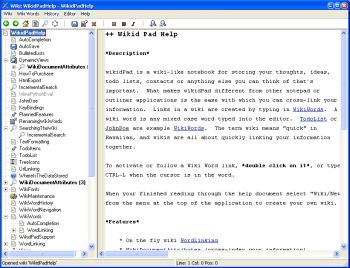
WikidPad is a wiki-like notebook for storing your thoughts, ideas,
to do lists, contacts, or anything else you can think of to write down.
The reason why this tool is different from other notepad applications
is the ease with which you can cross-link your information.


Yeah it’s so easy to cross link information. Links in a wiki are
created by typing in what is called WikiWords. And what is a WikiWord?
Any case word (also called CamelCase) typed into the editor e.g.
TodoList.


It is worthy of note that wikidPad is not a wikipedia thing; the
term wiki means “quick” in Hawaiian. Since wiki means quick, you can
rest assured that you are going to enjoy quickly linking your
information together.


The latest version, WikidPad 1.9 Beta 2 has these changes:


  • Better support for creating new tabs
  • Several bug fixes

Want to check it out? CLICK HERE!

Ganesh.KB


powered by performancing firefox

How to Create Your Own Website


1122940153-1.jpgIf
you are seeking to create a blog or website without any web designing
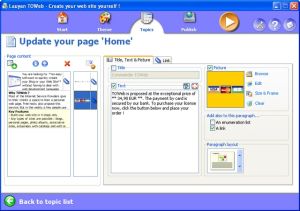
skill, I know something that will make it easy for you; TOWeb.


TOWeb is a software that is very useful for people and organizations
wishing to create a blog or a Web site without any Web designing
skills. It’s really very useful to use; just enter your texts, add your
pictures, and create your graphical theme using the random theme
generator features.


Using TOWeb you can add any kind of Web page to your website; you
can also enhance your pictures with frames and effects. What you will
appreciate about this software is that it lets you protect any
sensitive content with passwords, emails are automatically protected
from spam, and click a single button to publish your Web site to your
Web space using the provided list of hosts.


The latest version, TOWeb 1.71 has these changes:


  • Bug fix : catalog item names were not displayed in the index pages when the item paragraphs are indented
  • Improvement: the target of a link in a paragraph can now be
    specified. Default is the automatic mode but you may choose to open a
    link in the same web page or in a new web browser window
  • Bug fix : the topic group presentation with just an image was also displaying the title and the “More…” link
  • Bug fix : the option “Do not truncate texts and do not show the
    ‘More…’ links” located in the “Advanced topic settings” was not working
    for topic groups
  • Correction : links to catalog item pages inside the shopping cart
    may have been pointing to wrong items especially on catalogs containing
    more than 10 items

Want to check it out! CLICK HERE! Or go to http://www.lauyan.com/en/tw-home/index.html

Ganesh.KB


powered by performancing firefox

Trayit


tn.jpgTrayIt!
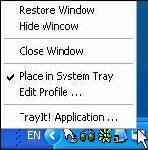
is a nifty tool for Windows 95/98/Me, NT/2000/XP. It lets you save
Taskbar space for minimized windows by creating a small icon, for each
application you apply to it, in the System Tray (The System Tray is the
area is located near the Windows Clock).


All you need to do is start trayit1.exe, which becomes an invisible
process on your machine, and then press and hold the Ctrl button on
your keyboard whenever you minimize an application window. Instead of
minimizing the application to your Taskbar, showing a rectangle with
the application’s icon and title bar description, you’ll just see the
application’s icon in the System Tray. You can then maximize the window
by clicking the icon.


TrayIt’s Web site says: “this is particularly useful for background
tasks you typically keep running on your PC all day long like your
favorite E-mail client, Real Player, etc..” But, for myself anyway, I
have a more important use for this tool: What I do is load Trayit! onto
my USB drive that I take everywhere with me for use as an external hard
drive. I plug this USB drive into computers that aren’t mine, such as
my sister’s family room computer whenever I’m over at her place. Then I
launch Trayit! from my USB drive which runs invisibly on her computer
until the computer is reboot. Every time I run an application that I
don’t want closed by another family member using the computer when I’m
away, I minimize it with Trayit! before I leave. Now my young nieces
won’t close any windows I have open that are perhaps performing a long
download, system scan, or whatever, while I’m away. Very handy.


One issue I’ve come across is that some applications, such as mIRC,
already implement a special feature when you hold the Ctrl key while
minimizing the window (doing so in mIRC allows you to set a temporary
password). This shouldn’t be a problem, as Trayit! should still
minimize the application properly after your particular application
runs it’s special feature.

Ganesh.KB


Technorati Tags:


powered by performancing firefox

Monday, February 26, 2007

Five Gmail secrets I did not know

Steve Rubel shares Five Gmail secrets that help you become more productive.

These secrets also give you more reason to try out Gmail.

Check out the post on MicroPersuasion

Sunday, February 18, 2007

Get yourself a Google account

You say "I don't need another account, I have too many already". A Google account will come in so handy, that you will ask your self "Why didn't I do this sooner?"

Gmail

Gmail gives you 2.8 Gigs of free storage. Gmail also blocks spam, saves your email in groups, and makes email searching a snap.
Gmail allows you to chat with your contacts if they use gmail.
You can send and receive email from any Internet connected computer and always have access to your emails and chat.
All of this and you don't have to download a thing. Best part...it's FREE!

Google Bookmarks

Now that you have a Google account, check out Google bookmarks.
This allows you to save important web pages where ever you are. You even get to "Label"(tag) them to make searching them easier.
Now, when you are at work, you don't have to try and remember that website that you bookmarked at home. Just look in your Google bookmarks...and there it is!
(make sure to use the easy "bookmarklet" to make saving bookmarks faster)

Thursday, February 15, 2007

How Google Works

DEXTER'S BLOG'S

This is going to be one of the best topic in my blog.This related to a popular search that is rocking the internet world, these people are not only the best and the topper in search but they have a lot of other products too. But this blog is only relating to search, the topper is none other than GOOGLE. This blog will give you a brief note about how google works, like how it picks pages when they are typed in to search engines. For a brief diagramatic explanation, read this link

Take care
Ganesh.KB

SEO’s seven most often asked questions

DEXTER'S BLOG'S

This article, includes the seven topics of the most frequently asked questions (FAQ) I have been getting lately on search engine optimization. These seven most often-asked questions are filled with important information and what I recommend the most for achieving the best overall results in efficient brand management and increased return on investment (ROI). To have clear picture about how it works and what should we do if we have any issues with SEO is detailed in this page. I found this to be very useful from this site...

Please read about this and have a clear picture about it.

Take care
Ganesh.KB

Monday, February 12, 2007

Enable Hidden BootScreen in Windows Vista

The Windows Vista BootScreen is pointless, but Microsoft decided to hide a more visually appealing boot screen that can easily be enabled with very little trouble.


read more | digg story

Mac OSX Expose Clone for Windows Vista

Now there is finally a Mac OSX Expose clone application for Windows Vista that runs great! Not only that, but it’s open source, so you can improve it if you wanted to.


read more | digg story

Skype hack enables higher resolution video calls

For those that do have sufficient bandwidth, a fast enough computer, and a capable webcam, there's an experimental hack for Skype that allows you to increase the resolution from the ancient 320 x 240 standard up to a much more tolerable 640 x 480. The hack only works one way, so users on both ends will have to apply it in order to see each other's


read more | digg story